Remote Phonebook
Contacts
Contacts can be imported through an API. Configure its URL, username and password with the other provisioning settings. The current app refreshes the remote phonebook when it returns to the foreground. Desktop also refreshes every ten minutes while foregrounded; mobile does not run a repeating background sync. The request uses GET unless POST data is configured below. The response can be JSON or XML.
Example JSON Response:
[
  {
    "Id": "602a52f538975909a8e36a48",
    "FirstName": "John",
    "LastName": "Doe",
    "Email": ["JDoe@gmail.com"],
    "Address": ["Privet Drive", "Norfolk"],
    "Softphone": ["23423423", "345345345"],
    "WorkNumber": ["000000000", "111111111111"],
    "HomeNumber": ["22222222", "333333333"],
    "MobileNumber": ["444444444", "555555555"],
    "Fax": ["6666666", "77777777"],
    "Other": ["8888888888", "999999999"]
  },
  {
    "Id": "602bf55338975909a8e36a49",
    "FirstName": "Jane",
    "LastName": "Doe",
    "Email": ["JDoeSmith@outlook.com"],
    "Address": ["James Street", "Suffolk"],
    "Softphone": ["03423423", "125345345"],
    "WorkNumber": ["100000000", "011111111111"],
    "HomeNumber": ["02222222", "033333333"],
    "MobileNumber": ["044444444", "055555555"],
    "Fax": ["0666666", "07777777"],
    "Other": ["0888888888", "099999999"]
  }
]
Example XML response
<Contacts>
	<Contact>
		<Id>602a52f538975909a8e36a48</Id>
		<FirstName>
			John
		</FirstName>
		<LastName>
			Doe
		</LastName>
		<Email>
			<string>JDoe@gmail.com</string>
		</Email>
		<Address>
			<string>Privet Drive</string>
			<string>Norfolk</string>
		</Address>
		<Softphone>
			<string>23423423</string>
			<string>345345345</string>
		</Softphone>
		<WorkNumber>
			<string>000000000</string>
			<string>111111111111</string>
		</WorkNumber>
		<HomeNumber>
			<string>22222222</string>
			<string>333333333</string>
		</HomeNumber>
		<MobileNumber>
			<string>444444444</string>
			<string>555555555</string>
		</MobileNumber>
		<Fax>
			<string>6666666</string>
			<string>77777777</string>
		</Fax>
		<Other>
			<string>8888888888</string>
			<string>999999999</string>
		</Other>
	</Contact>
</Contacts>
Description of Keys
Id
Unique identifier of contact. Contacts without this will be ignored
Checksum
A string value which should change if any field in the contact changes. The softphone will use this
to determine whether to update the contact with new information
HomeNumber, MobileNumber, WorkNumber, Fax, Softphone, Other Array of string values containing phone numbers.
CountryCode
ISO2 country code
Array of strings containing email addresses
The strings inside contacts should use UTF-8 encoding.
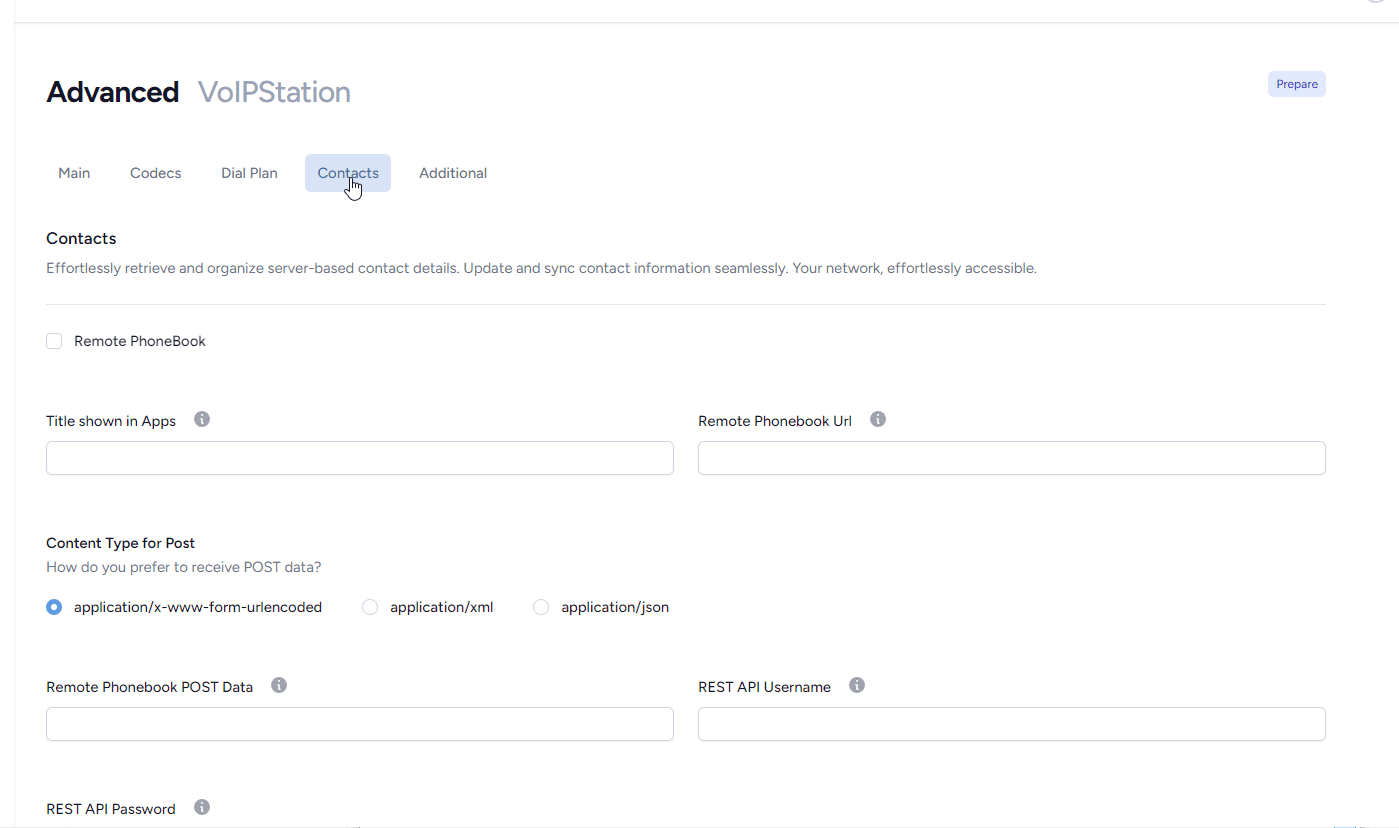
Remote PhoneBook
if enabled the softphone will attempt to import contacts via REST API from the url specified in Remote Phonebook Url field
Title shown in Apps
This is the Group ( Desktop softphones) that the contacts will be assigned to within the apps
Remote Phonebook Url
REST API endpoint
Remote Phonebook POST Data
If present the app will use POST rather than GET
Example for application/json
{"username" : "%user%","password" : "%pwd%", "domain": "%domain%"}