Synchronous push registration
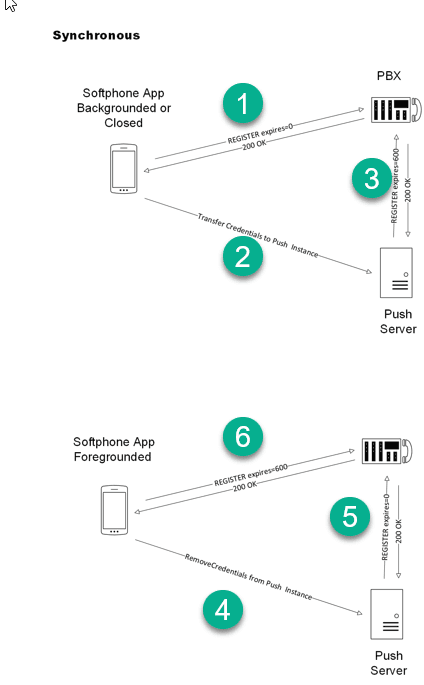
For a BYO PBX account using PushSynchronous, the app and push server hand over the PBX registration as the app moves between foreground and background. This mode is intended for services that cannot rely on simultaneous registrations.
Backgrounding the app
The app makes a bounded attempt to unregister its direct PBX binding, stops the idle SIP worker and requests push-server registration when push is enabled. If direct unregistration fails or cannot be confirmed, it logs that outcome and retains the old binding for cleanup. An unresponsive old registration does not indefinitely prevent push registration.
Returning to the foreground
The app first asks the push server to remove the PBX registration held on its behalf. On success, it waits for completion before registering directly. If removal fails, times out or cannot be confirmed, the app logs the outcome and proceeds with direct foreground registration so the account can become usable.
This is a best-effort handoff when removal cannot be confirmed; it is not a guarantee that an old PBX binding has already disappeared. Check the app and server logs when diagnosing registration overlap.
During a push call
The app-to-push-server connection carries the active call and remains open until the call ends. Removing the push server’s PBX registration is separate from closing that connection.
With Block register during push enabled, the foreground registration handoff is deferred until the call ends. Without it, foreground removal is attempted immediately while preserving the active call transport and dialogs.
These are BYO push rules. SessionPBX accounts use a separate hosted push path.